

Perfect Uninstaller is a better and easier way for you to completely unistall any unneeded application that standard Windows Add/Remove Program can't remove. Have you ever been bothered with software applications that can't be uninstalled by the standard Windows Add/Remove Programs? You are the right place!
What Perfect Uninstaller can do for you ?
Uninstall / Remove Any Unneeded Application In Your PC;
Forcibly Remove Unneeded Applciation That your own pc Add/Remove Program can't remove;
Clear registry entries and drivers that the applications leave over;
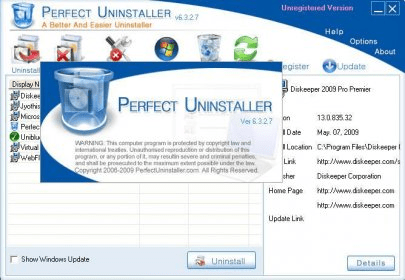
Show detailed information of a certain application installed in your computer.
With Perfect Uninstaller , you can uninstall unneeded applications in your system easier and faster. The Standard Add /Remove Program often can not completely uninstall some applications and broken registry keys, unlike your own pc Add/Remove Program , Perfect Unistall can't only uninstall the applications itselves, but aslo can clean the registry files they leave over, it wil protect your pc from corrupted registry errors , improve your pc performance and speed !
Feartures And Benefits:3 times faster than the standard Windows Add/Remove program ; 3 ways of application view: by Icons, by List, by Details; Remove programs that could not be removed by Add/Remove program; Completely clean the empty / corrupt registry entries that a certain application left over; Protect your registry from empty / corrupted errors, improve pc performance ; Forcibly remove hidden application installed in your system; Fast point to the folder where application installed; Navigate to a selected program's Registry Entry, Installation Folder and its Web Site; View detailed information of a certain application installed on your computer; Easy to use and Freindly user interface ; Show detailed about currentlly installed applications.













Comments